
What Happens to Body-Camera Footage After an Officer Stops Recording?
This is the second article in the PC Expertz Public Safety Technology Series. In our first article, we looked beyond the body-worn camera itself. We explored the technology, connectivity, security and policies that support a modern body-camera programme.
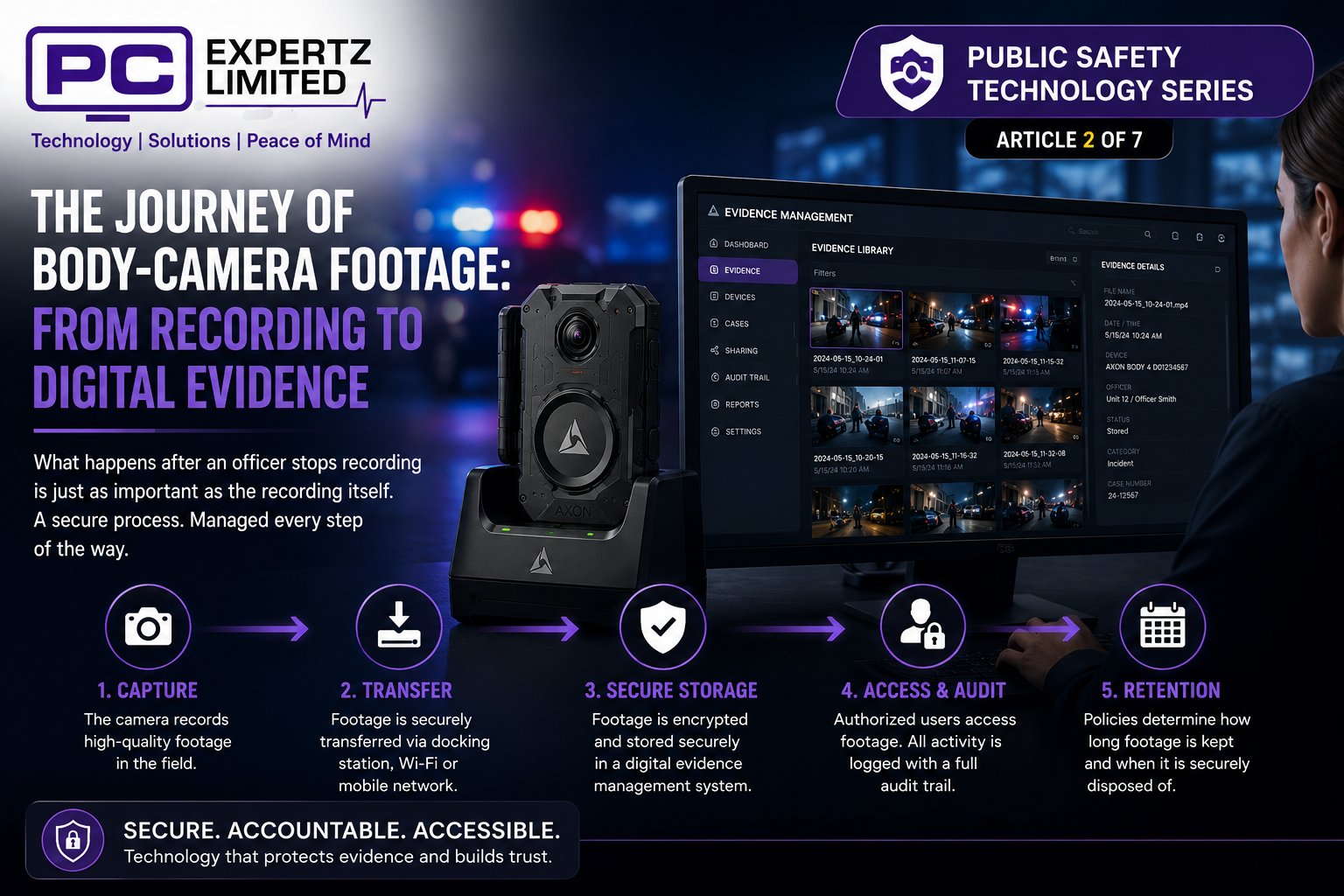
This time, we follow the recording. When an officer stops recording, the video does not simply become another file stored on a camera. Instead, it begins a journey through a digital evidence management system. What happens during that journey can be just as important as capturing the original event.
From the Camera to Secure Storage
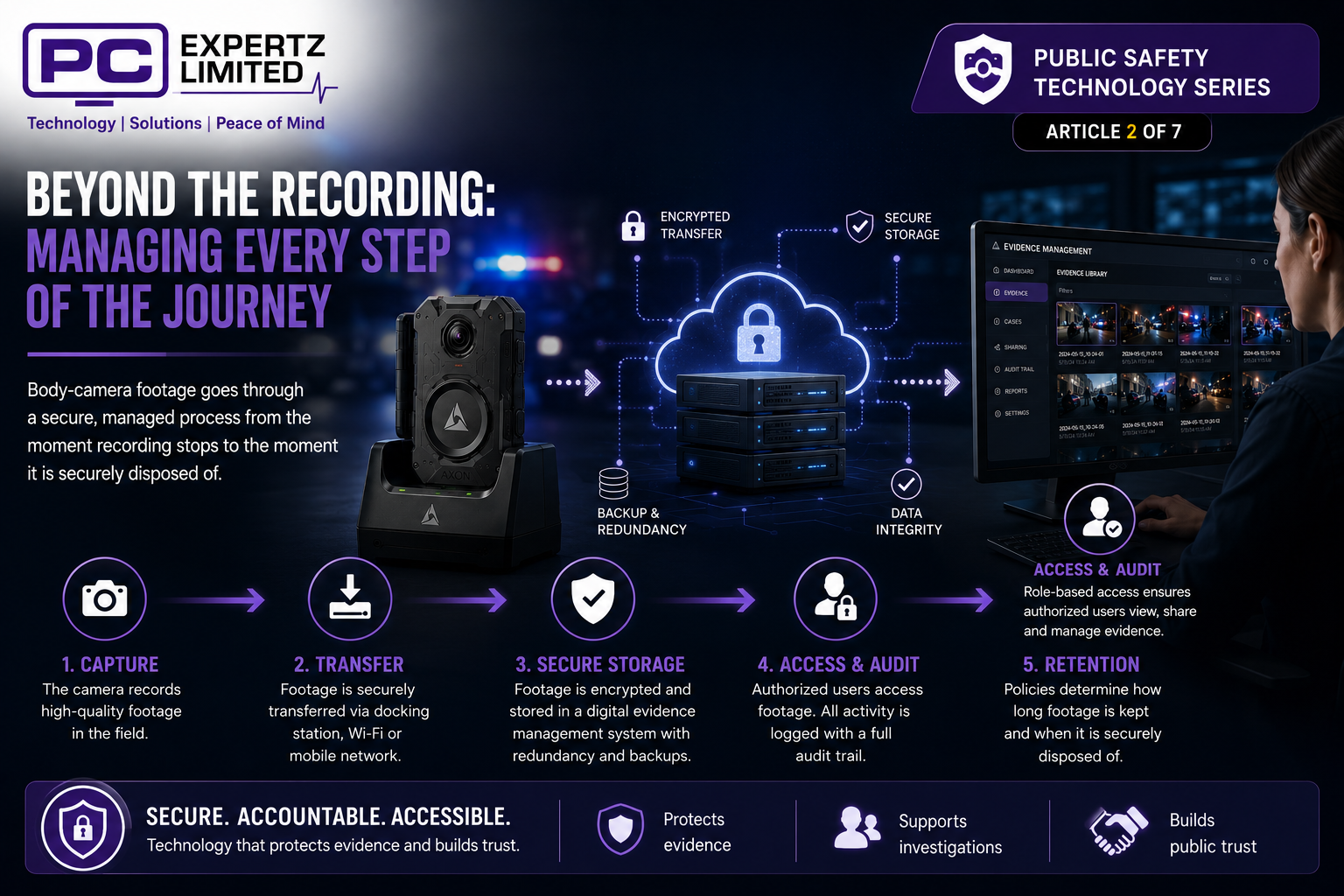
A body-worn camera can create hours of video during normal operations. Therefore, agencies need an efficient way to move recordings from the camera into secure storage. Depending on the technology, docking stations, secure Wi-Fi or mobile networks can support this transfer.
Automated processes can also reduce the need for officers to copy or move files manually. This creates a more structured process and reduces unnecessary handling of digital evidence. Once the system receives the recording, the next stage begins.
Turning Video Into Managed Digital Evidence
Storing video is one thing. Managing thousands of recordings is something entirely different.
A digital evidence management system can organize recordings and connect them with relevant information. This makes it easier for authorized personnel to locate evidence when they need it. Good organization becomes increasingly important as the number of cameras grows.
Consider the scale involved. Ten cameras can already produce a considerable amount of video. Hundreds or thousands of cameras can create an enormous digital evidence library. Without effective management, finding one important recording among thousands of hours of footage could become difficult.
Who Can Access the Footage?
Body-camera footage can contain sensitive information, so access needs careful control. A digital evidence management system can give different users access based on their roles and responsibilities. This avoids giving everyone unrestricted access to every recording.
For example, an investigator may need evidence connected to a specific case. A supervisor may need access for an administrative review. The system can provide the appropriate level of access while protecting other recordings.
This approach helps agencies balance two important requirements. Authorized personnel need practical access to evidence, while the organization needs to protect sensitive information.
Creating an Audit Trail
Managing access is only part of the process. Agencies also need a reliable record of what happens to digital evidence after the system receives it.
Modern evidence systems can create an audit trail of activity involving a recording. For example, the system can record when authorized users view, manage or share evidence. This creates a history around the digital file.
That history can become especially important during investigations or legal proceedings. It helps answer questions about how people handled the evidence and who interacted with it. As a result, audit trails can strengthen confidence in the evidence-management process.
How Long Should Body-Camera Footage Be Kept?
Not every body-camera recording needs the same retention period. Routine footage may have different requirements from video linked to an investigation, complaint or legal proceeding.
Policies can establish how long an organization keeps each type of evidence. Technology can then help apply those policies consistently across the evidence library.
Retention becomes increasingly important as body-camera programmes grow. Keeping every recording indefinitely could create unnecessary storage requirements. However, removing important footage too early could create a very different problem. A structured retention process helps organizations manage both concerns.
Sharing Digital Evidence Securely
Investigators, prosecutors or other authorized parties may sometimes need access to specific recordings. A digital evidence management system can provide controlled ways to manage that process.
This reduces the need to rely on informal methods for moving sensitive evidence. Instead, organizations can maintain greater control over how authorized users access and share recordings.
The objective is simple. Make legitimate access practical while maintaining security, accountability and confidence in the evidence.
Why the Process Matters
A body-worn camera captures an event, but the value of that recording depends heavily on what happens next. Secure transfer protects the footage as it leaves the camera. Evidence management organizes it, while access controls help protect sensitive information.
Audit trails add another layer by recording activity around the evidence. Retention policies then help manage that evidence throughout its useful life. These components work together as part of a much larger technology ecosystem.
For Trinidad and Tobago, understanding this process can broaden the discussion around body-worn camera technology. The camera we see on an officer is only the starting point. Behind it sits an infrastructure designed to manage large amounts of digital evidence securely and efficiently.
From Recording to Digital Evidence
The moment an officer stops recording can begin a much longer digital process. The footage needs to move securely from the camera into an environment that can organize, protect and manage it.
Authorized personnel also need a reliable way to retrieve evidence when required. At the same time, policies and technology must control access and determine how the organization manages recordings over time.
That is the difference between simply having video and having managed digital evidence.
The camera records the event. The technology behind it helps make that recording secure, organized and useful when it matters.
In the next article in our PC Expertz Public Safety Technology Series, we will explore another side of the discussion: Can body-worn cameras protect police officers too?
Navigation Links
Part 1: Body Cameras Are Changing Public Safety. But the Camera Is Only Half the Story.
Part 2: What Happens to Body-Camera Footage After an Officer Stops Recording?
Part 3: Can Body Cameras Protect Police Officers Too?
Part 4: From Body Camera to Courtroom: Can You Trust the Digital Evidence?
Part 5: What Happens When Thousands of Hours of Body-Camera Video Start Piling Up?
Part 6: AI and Body Cameras: The Next Stage of Digital Evidence
Part 7: What Should Trinidad & Tobago Expect From a Modern Body-Worn Camera Programme?
WhatsApp: +1 (868) 798-9762
Email: admin1@pcexpertz.com
Website: pcexpertz.com